
diff options
| author | amankumarsingh77 <amankumarsingh7702@gmal.com> | 2026-05-02 00:38:39 +0530 |
|---|---|---|
| committer | amankumarsingh77 <amankumarsingh7702@gmal.com> | 2026-05-02 00:38:39 +0530 |
| commit | 5762eae6cc7f196020403a38f9d89d15e0ad1d61 (patch) | |
| tree | 1738848490498e716f1e184a8aa16957b48613de /README.md | |
| parent | 40c18b2234cb03486719efaaabf5bc69d30f1f35 (diff) | |
docs: rewrite README — add hero image, condense tools, fix accuracy
- Add hero image banner at top
- Merge 4 tool tables into 1 compact reference table
- Fix tool syntax to match actual parameter schemas
- Add Core Patterns section (navigation, form fill, extraction, research)
- Add Dialogs, SPAs, Keyboard modifiers subsections
- Add What NOT to do section
- Add Architecture diagram
- Add Contributing link
- Remove verbose/duplicate usage examples
Diffstat (limited to 'README.md')
| -rw-r--r-- | README.md | 246 |
1 files changed, 134 insertions, 112 deletions
@@ -1,6 +1,8 @@ # pi-browser-harness -Full browser control for pi agents. Navigate, click, type, screenshot, and extract data from your real Chrome — driven by your coding agent. +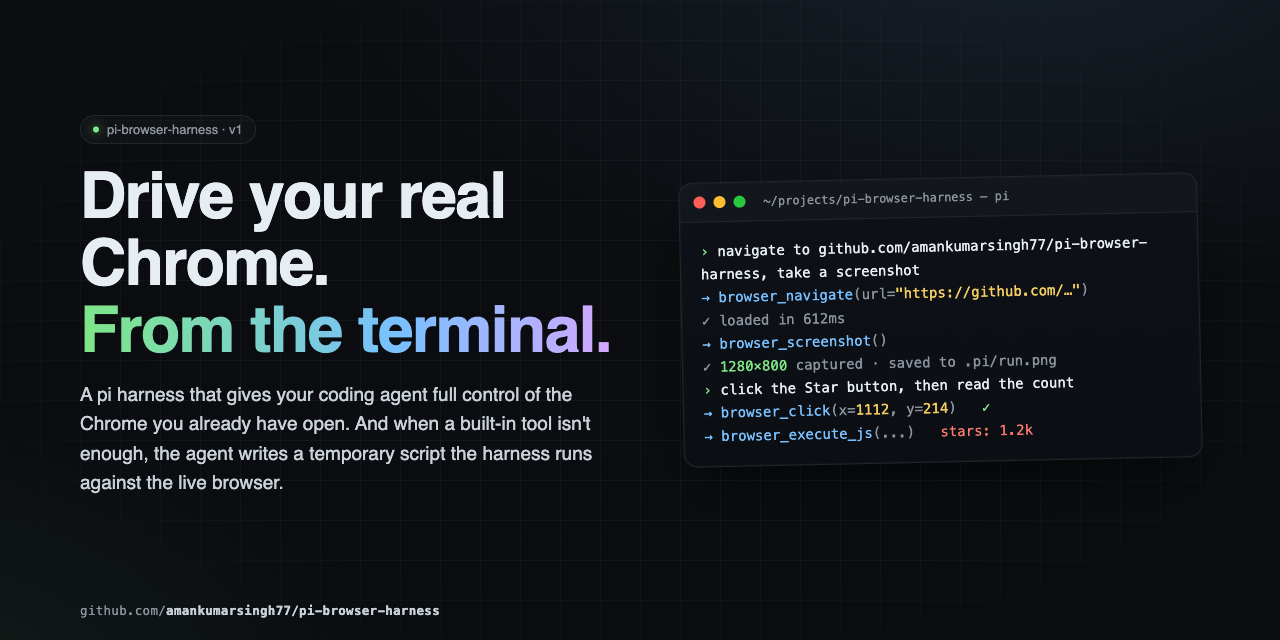 + +Full browser control for pi agents. Navigate, click, type, screenshot, and extract data from your real Chrome — all driven through natural language via CDP. --- @@ -10,173 +12,163 @@ Full browser control for pi agents. Navigate, click, type, screenshot, and extra # 1. Install pi install npm:pi-browser-harness -# Or install from GitHub: -# pi install git:github.com/amankumarsingh77/pi-browser-harness - # 2. Enable Chrome remote debugging # Open chrome://inspect/#remote-debugging in Chrome, -# tick the "Discover network targets" checkbox, click Allow. -# No Chrome relaunch needed. +# tick "Discover network targets", click Allow. +# Or launch Chrome with --remote-debugging-port=9222 -# 3. Connect pi to Chrome +# 3. Connect /browser-setup ``` -That's it. Try: - -``` -> navigate to https://github.com and take a screenshot -``` - ### Requirements - pi (latest) - Node.js ≥ 22 -- Chrome / Chromium / Edge (any recent version) - -> If `chrome://inspect/#remote-debugging` isn't available, you can launch Chrome with `--remote-debugging-port=9222` instead. The harness will find it either way. +- Chrome / Chromium / Edge --- -## What you can do +## Tools -### Navigation & tabs - -| Tool | What it does | -|------|--------------| -| `browser_navigate` | Go to a URL (reuses the attached tab) | +| Tool | Purpose | +|------|---------| +| `browser_screenshot` | Capture a PNG screenshot of the current page | +| `browser_click` | Click at viewport coordinates | +| `browser_type` | Type text into the focused element | +| `browser_press_key` | Press a key (Enter, Tab, Escape, arrows, etc.) with optional modifiers | +| `browser_scroll` | Scroll the page by delta pixels | +| `browser_navigate` | Navigate to a URL | | `browser_new_tab` | Open a new tab, optionally navigate | -| `browser_open_urls` | Open many URLs in parallel tabs | -| `browser_go_back` / `browser_go_forward` | History navigation | -| `browser_reload` | Reload the current page | -| `browser_list_tabs` / `browser_current_tab` | Discover tabs | -| `browser_switch_tab` | Switch the active tab | -| `browser_page_info` | URL, title, viewport, scroll, dialog state | - -### Interaction - -| Tool | What it does | -|------|--------------| -| `browser_click` | Click at viewport coordinates (works through iframes / shadow DOM) | -| `browser_type` | Type into the focused element | -| `browser_press_key` | Send a key with optional modifiers | -| `browser_scroll` | Scroll by delta pixels | -| `browser_handle_dialog` | Accept or dismiss `alert` / `confirm` / `prompt` | - -### Visual & data - -| Tool | What it does | -|------|--------------| -| `browser_screenshot` | Capture the current page as PNG | -| `browser_execute_js` | Run JS in the page and return the result | -| `browser_http_get` | Direct HTTP GET — bypasses the browser, much faster for APIs | +| `browser_open_urls` | Open multiple URLs in parallel tabs | +| `browser_go_back` / `browser_go_forward` / `browser_reload` | History navigation | +| `browser_page_info` | Get URL, title, viewport, scroll position, or dialog state | +| `browser_list_tabs` / `browser_current_tab` / `browser_switch_tab` | Tab discovery and switching | +| `browser_execute_js` | Run JavaScript in the page and return the result | +| `browser_http_get` | Direct HTTP GET outside the browser — much faster for APIs | | `browser_wait` / `browser_wait_for_load` | Sleep, or wait for `readyState === 'complete'` | - -### Extending the harness at runtime - -| Tool | What it does | -|------|--------------| -| `browser_run_script` | Execute a temporary script file with daemon access | +| `browser_handle_dialog` | Accept or dismiss `alert` / `confirm` / `prompt` | +| `browser_run_script` | Execute a temporary script with daemon and Node.js access | --- -## Usage +## Core Patterns -The core pattern is **screenshot → act → screenshot → verify.** Don't assume an action worked — look. +The golden rule: **screenshot → act → screenshot → verify.** Never assume — always look. -### Navigate and screenshot +### Navigation ``` -browser_navigate("https://github.com/browser-use/browser-harness") +browser_new_tab({ url: "https://example.com" }) browser_wait_for_load() browser_screenshot() ``` -### Fill a form +### Form filling ``` -browser_screenshot() # see the form -browser_click(400, 200) # click the search input -browser_type("pi browser harness") # type -browser_press_key("Enter") # submit +browser_screenshot() # see the form +browser_click({ x: 400, y: 200 }) # click the search input +browser_type({ text: "query" }) # type +browser_press_key({ key: "Enter" }) # submit browser_wait_for_load() -browser_screenshot() # verify +browser_screenshot() # verify ``` -### Extract data +### Data extraction -```js -// Fast: hit the API directly, no browser -browser_http_get("https://api.github.com/repos/browser-use/browser-harness") +``` +browser_execute_js({ expression: "document.querySelector('.price').innerText" }) -// DOM scraping for rendered content -browser_execute_js("document.querySelector('.price').innerText") +browser_http_get({ url: "https://api.github.com/repos/amankumarsingh77/pi-browser-harness" }) // Structured arrays -browser_execute_js(` - JSON.stringify( - Array.from(document.querySelectorAll('.result')).map(el => ({ - title: el.querySelector('h3')?.textContent, - link: el.querySelector('a')?.href, - })) - ) -`) +browser_execute_js({ expression: `Array.from(document.querySelectorAll('.result')).map(el => ({ + title: el.querySelector('h3')?.textContent, + link: el.querySelector('a')?.href, +}))` }) ``` -### Open multiple results in parallel +### Research workflow ``` -browser_navigate("https://google.com/search?q=chrome+devtools+protocol") -browser_open_urls({ urls: [ - "https://chromedevtools.github.io/devtools-protocol/", - "https://developer.chrome.com/docs/devtools", -]}) +browser_navigate({ url: "https://google.com/search?q=..." }) +// read search results +browser_open_urls({ urls: ["url1", "url2", "url3"] }) browser_list_tabs() browser_switch_tab({ targetId: "..." }) +browser_screenshot() +browser_execute_js({ expression: "document.querySelector('.content').innerText" }) ``` -### SPAs - -`browser_wait_for_load` only checks `readyState`. For React/Vue/etc., poll for the actual element you want: +### Scrolling -```js -browser_execute_js("!!document.querySelector('.loaded-content')") +``` +browser_screenshot() +browser_scroll({ deltaY: -500 }) +browser_screenshot() ``` ### Keyboard modifiers -`browser_press_key` takes a modifier bitfield: `Alt=1`, `Ctrl=2`, `Meta/Cmd=4`, `Shift=8`. Combine with `|`. +| Key | Bit | +|-----|-----| +| Alt | 1 | +| Ctrl | 2 | +| Meta / Cmd | 4 | +| Shift | 8 | +Combine with bitwise OR: ``` -browser_press_key("c", { modifiers: 2 }) // Ctrl+C -browser_press_key("v", { modifiers: 4 }) // Cmd+V -browser_press_key("T", { modifiers: 10 }) // Ctrl+Shift+T +browser_press_key({ key: "c", modifiers: 2 }) // Ctrl+C +browser_press_key({ key: "v", modifiers: 4 }) // Cmd+V +browser_press_key({ key: "T", modifiers: 10 }) // Ctrl+Shift+T ``` -### Writing a temporary script +### SPAs (React, Vue, etc.) -When the built-ins aren't enough, write a script to disk and run it with `browser_run_script`. +`browser_wait_for_load` only checks `readyState`. Poll for elements after: + +``` +browser_execute_js({ expression: "!!document.querySelector('.loaded-content')" }) +``` + +### Dialogs + +JS dialogs (`alert` / `confirm` / `prompt`) freeze the page. Check `browser_page_info` first — if it reports a dialog, handle it before anything else: + +``` +browser_handle_dialog({ action: "accept" }) // confirm +browser_handle_dialog({ action: "dismiss" }) // cancel +browser_handle_dialog({ action: "accept", promptText: "hello" }) // prompt +``` + +--- + +## Temporary Scripts + +When built-in tools aren't enough, write a script to disk and run it: ```js -// 1. Write the script to disk -write("/tmp/scrape-results.js", ` - const data = await daemon.evaluateJS(\` - JSON.stringify( - Array.from(document.querySelectorAll('${params.selector}')) - .map(el => el.textContent.trim()) - ) - \`); - return { - content: [{ type: "text", text: data }], - details: { items: JSON.parse(data) }, - }; +// 1. Write the script +write("/tmp/scrape-pages.js", ` + const results = []; + for (const url of params.urls) { + await daemon.cdp("Page.navigate", { url }); + await new Promise(r => setTimeout(r, 2000)); + const title = await daemon.evaluateJS("document.title"); + results.push({ url, title }); + } + return { content: [{ type: "text", text: JSON.stringify(results, null, 2) }] }; `) // 2. Execute it -browser_run_script("/tmp/scrape-results.js", { selector: ".result" }) +browser_run_script({ path: "/tmp/scrape-pages.js", params: { urls: [...] } }) ``` -Scripts receive `params`, `daemon`, `require`, `signal`, `onUpdate`, `ctx`, plus the standard JS globals. The script is on disk — auditable and re-runnable. +**Script bindings:** `params`, `daemon`, `require`, `signal`, `onUpdate`, `ctx`, `console`, `fetch`, `JSON`, `Buffer`, `setTimeout`, `clearTimeout`. + +Scripts are written to disk — auditable and re-runnable. --- @@ -190,20 +182,50 @@ Scripts receive `params`, `daemon`, `require`, `signal`, `onUpdate`, `ctx`, plus --- +## What NOT to do + +- Don't launch your own browser — you're connected to the user's real Chrome +- Don't type credentials — if you hit an auth wall, stop and ask +- Don't assume a page action worked — screenshot to verify +- Don't write pixel coordinates into documentation — describe selectors and text instead +- Don't ignore dialogs — check `browser_page_info` first + +--- + +## Architecture + +``` +pi agent → pi-browser-harness (TypeScript) + │ CDP WebSocket + ▼ + Chrome +``` + +Temporary scripts run inside the harness process with full daemon and Node.js access. + +--- + ## Troubleshooting | Symptom | Fix | |---------|-----| -| `DevToolsActivePort not found` | Open `chrome://inspect/#remote-debugging`, tick the checkbox, click Allow, then retry. | -| Connection fails after Chrome restart | Run `/browser-reload-daemon`. | -| Page seems loaded but content is missing | SPA — `browser_wait_for_load` isn't enough. Poll with `browser_execute_js` for the element you need. | -| A JS dialog is blocking actions | `browser_page_info` will report the dialog. Use `browser_handle_dialog` to accept or dismiss. | +| `DevToolsActivePort not found` | Open `chrome://inspect/#remote-debugging`, tick the checkbox, click Allow | +| Connection fails after Chrome restart | Run `/browser-reload-daemon` | +| Page seems loaded but content is missing | SPA — poll with `browser_execute_js` for the element you need | +| A JS dialog is blocking actions | `browser_page_info` will report it — use `browser_handle_dialog` | +| Daemon not starting | Run `/browser-setup` to re-run guided setup | + +--- + +## Contributing + +See [CONTRIBUTING.md](CONTRIBUTING.md) for setup, conventions, and PR process. --- ## Security -This extension drives your real Chrome. The agent can see open tabs, read page content, submit forms, and act inside authenticated sessions. `browser_run_script` evaluates JavaScript in the pi process with full `require` access — review any temporary scripts the agent writes to `/tmp/` before executing them. +This extension drives your real Chrome. The agent can see open tabs, read page content, submit forms, and act inside authenticated sessions. `browser_run_script` evaluates JavaScript in the pi process with full `require` access — review any temporary scripts before executing them. --- |