herdr
herd your agents.
herdr.dev · install · usage · configuration · socket api
---
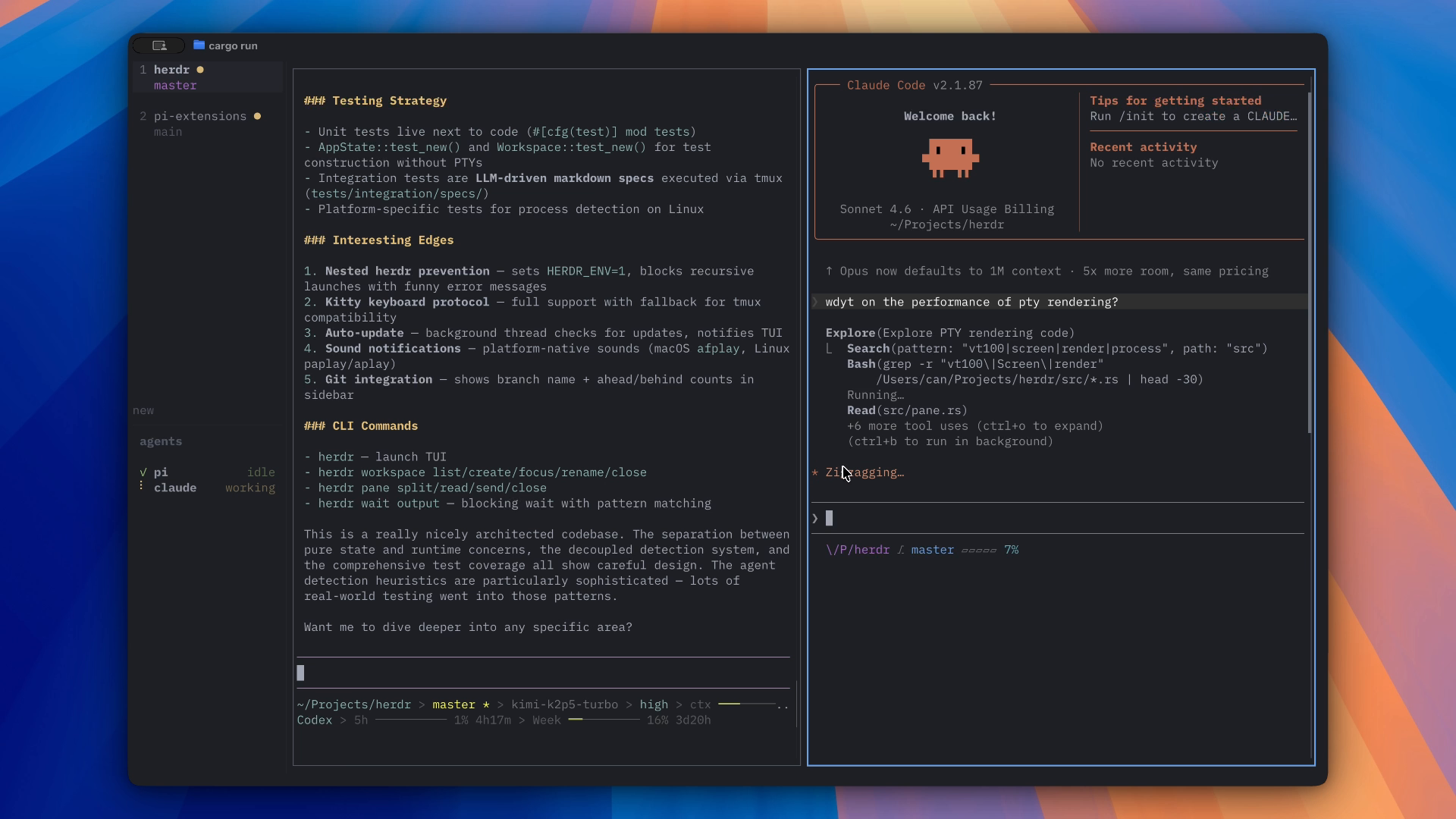
herdr is a terminal workspace manager for AI coding agents. it runs inside your existing terminal: ghostty, alacritty, kitty, wezterm, even inside tmux. a single rust binary that gives you workspaces, tiled panes, intelligent agent state detection, and optional notification alerts.
it stays terminal-native without forcing a keyboard-only workflow: use prefix keys when you want, click and drag when you don't.
you keep your terminal. herdr keeps track of your agents.
## philosophy
every tool in this space is building more. desktop apps, electron wrappers, web dashboards, all trying to replace your terminal with their own environment.
herdr takes the opposite approach. it's a tool that lives where you already work. it sits alongside tmux, inside your terminal emulator, part of your existing workflow. it does one thing well: lets you run multiple coding agents in parallel and know when they need you.
the terminal is already a great environment for coding agents. what's been missing is awareness: seeing at a glance which agent is idle, which is working, and which needs your input. herdr adds that layer.
herdr also keeps workspace creation lightweight. a workspace is a terminal context, not a preconfigured project artifact. create one and it opens immediately; herdr labels it from your current repo or folder. you can rename it later, but that's an override, not a prerequisite.
it also treats mouse support as a first-class interaction model, not an afterthought. click the sidebar to switch workspaces, drag pane borders to resize, scroll panes, and use the keyboard whenever it's faster.
## how it works
herdr embeds real terminal emulators using PTY and vt100 parsing. each pane is a full terminal: your shell, your agent, your tools, exactly as they'd run anywhere else.
the sidebar shows your workspaces. each workspace can have multiple tiled panes. the agent detection system reads terminal output in real time and determines what state each agent is in:
- **●** red: agent is waiting for your input
- **●** yellow: agent is working
- **●** blue: agent finished (you haven't looked yet)
- **○** green: agent is idle, you've seen it
when an agent finishes work in a background workspace, its dot turns blue. you see it at a glance and switch over. if you want more interruption, herdr can also play sounds or show top-right toast alerts for background events.
## supported agents
herdr detects agent state by identifying the foreground process and reading terminal output patterns. the following agents have been tested:
| agent | idle | busy | needs attention |
|-------|------|------|-----------------|
| [pi](https://pi.dev) | ✓ | ✓ | partial |
| [claude code](https://docs.anthropic.com/en/docs/claude-code) | ✓ | ✓ | ✓ |
| [codex](https://github.com/openai/codex) | ✓ | ✓ | ✓ |
| [droid](https://factory.ai) | ✓ | ✓ | ✓ |
| [amp](https://ampcode.com) | ✓ | ✓ | partial |
| [opencode](https://github.com/anomalyco/opencode) | ✓ | ✓ | ✓ |
detection heuristics also exist for these agents but haven't been fully tested yet. if you use them and run into issues, please [open an issue](https://github.com/ogulcancelik/herdr/issues):
- [gemini cli](https://github.com/google-gemini/gemini-cli)
- [cursor agent](https://cursor.com/cli)
- [cline](https://github.com/cline/cline)
- [kimi](https://kimi.ai)
- [github copilot cli](https://cli.github.com)
for any other CLI agent, herdr still works as a workspace manager. you still get workspaces, panes, and tiling. a hook system for custom agent state reporting is coming soon.
## install
```bash
curl -fsSL https://herdr.dev/install.sh | sh
```
or download the binary directly from [releases](https://github.com/ogulcancelik/herdr/releases).
requirements: linux or macos.
### update
herdr checks for updates automatically in the background. when a new version is ready, you'll see a notification in the UI. just restart to apply. you can also update manually:
```bash
herdr update
```
## usage
launch herdr:
```bash
herdr
```
on first run, herdr opens a short onboarding flow so you can choose your notification style. after that, if a session is restored you'll land in terminal mode; otherwise you'll start in **navigate mode**.
press `n` to create your first workspace. it opens immediately as a new terminal context, using an automatic label based on your current repo or folder.
press `ctrl+b` (the prefix key) to switch back to navigate mode. from there you can manage workspaces and panes.
### navigate mode (prefix: ctrl+b)
navigate mode is the workspace control layer. movement actions stay in navigate mode; mutating actions like split, close, new workspace, and sidebar toggle return you to terminal mode.
common defaults:
- `n` new workspace
- `shift+n` rename workspace
- `d` close workspace
- `v` / `-` split pane
- `x` close pane
- `f` fullscreen
- `r` resize mode
- `b` toggle sidebar
full keybinding and config reference: [`CONFIGURATION.md`](./CONFIGURATION.md)
### resize mode
| key | action |
|-----|--------|
| `h` `l` | resize width |
| `j` `k` | resize height |
| `esc` | exit resize mode |
### mouse
mouse support is built in. herdr is not keyboard-only.
- click a workspace in the sidebar to switch
- click a pane to focus it
- drag split borders to resize
- drag in a pane to select text; release to copy it to your system clipboard
- right-click a workspace for context menu
- scroll in sidebar to navigate workspaces
- click `«` / `»` at the sidebar bottom to collapse/expand
text copy uses OSC 52, so it depends on your terminal's clipboard support.
### terminal mode
you're in a real terminal. everything works: your shell, vim, htop, ssh, anything. press the prefix key (`ctrl+b`) to go back to navigate mode.
## configuration
config file: `~/.config/herdr/config.toml`
print the full default config with:
```bash
herdr --default-config
```
### themes
herdr ships with 9 built-in themes: catppuccin (default), tokyo night, dracula, nord, gruvbox, one dark, solarized, kanagawa, and rosé pine.
```toml
[theme]
name = "tokyo-night"
```
you can also override individual color tokens on top of any base theme. see [`CONFIGURATION.md`](./CONFIGURATION.md) for the full token reference.
for all keybindings, onboarding, notification, sound, UI options, and environment variables, see [`CONFIGURATION.md`](./CONFIGURATION.md).
## session persistence
herdr saves your workspace layout, pane working directories, and focused pane on exit. when you restart, everything is restored. sessions are stored at `~/.config/herdr/session.json`.
use `--no-session` to start fresh.
## how agent detection works
herdr doesn't require hooks or agent-side configuration. detection works by:
1. identifying the foreground process of each pane's PTY (via `/proc` on linux, `proc_pidinfo` on macos)
2. matching the process name against known agents
3. reading terminal screen content and applying per-agent heuristics to determine state
this means detection works with any supported agent, installed any way, with zero setup. if it runs in a terminal, herdr can see it.
the heuristics are pattern-matched against each agent's actual terminal output: prompt boxes, spinners, "waiting for input" messages, tool execution indicators. detection runs on a separate async task per pane, polled every 300-500ms, decoupled from terminal rendering.
## socket api
herdr now has a local unix socket API for scripts, tools, and coding agents.
you can:
- create, focus, rename, and close workspaces
- list, inspect, read, split, and close panes
- send text / keys into panes
- wait for output matches
- subscribe to lifecycle, agent, and output-match events over a single long-lived connection
see [`SOCKET_API.md`](./SOCKET_API.md) for request shapes, examples, and subscription behavior.
## what's coming
- **notification hooks**: richer agent/script-side state reporting on top of the socket foundation, so unsupported tools can report status directly to herdr.
- **in-app preferences**: rerun onboarding and adjust things like sound and toast notifications without editing config by hand.
- **native notifications**: OS-level notifications when an agent needs attention and herdr isn't in focus.
- **expanded cli wrapper**: more shell-friendly commands on top of the socket API, especially broader workspace/pane management and streaming event wrappers.
## built with agents
i had never written rust before starting this project. herdr was built almost entirely through AI coding agents, the same ones it's designed to manage. i supervised the architecture and specs, agents wrote the code.
this is a proof of concept in more ways than one. it's a functional tool, but it's also a statement about what's possible right now. if you can build a terminal multiplexer in a language you don't know, by directing the same agents the tool is built for, that says something about where we are.
there will be rough edges. if you hit one, [open an issue](https://github.com/ogulcancelik/herdr/issues). that's why it's open source.
## cli
built-in commands:
```text
herdr launch herdr
herdr update download and install the latest version
herdr workspace list list workspaces
herdr workspace create ... create a workspace
herdr workspace get inspect one workspace
herdr workspace focus focus a workspace
herdr workspace rename ... rename a workspace
herdr workspace close close a workspace
herdr pane list ... list panes
herdr pane get inspect one pane
herdr pane read ... read pane output
herdr pane split ... split a pane
herdr pane close close a pane
herdr pane send-text send text without submitting
herdr pane send-keys send keypresses like Enter
herdr pane run send text and press Enter
herdr wait output ... block until output matches
herdr wait agent-state ... block until pane reaches a state
herdr --version print version
herdr --default-config print default configuration
herdr --no-session start without restoring or saving sessions
herdr --help show help
```
workspace ids are compact public ids like `1`, `2`, `3`.
pane ids are compact public ids like `1-1`, `1-2`, `2-1`.
they are positional within the current live session, so numbering compacts when workspaces or panes are closed.
these commands are thin wrappers over the socket API:
- [`SOCKET_API.md`](./SOCKET_API.md)
## building from source
```bash
git clone https://github.com/ogulcancelik/herdr
cd herdr
cargo build --release
./target/release/herdr
```
## testing
```bash
just test # unit tests
just test-integration # LLM-based integration tests
just test-all # both
```
## license
AGPL-3.0: free to use, modify, and distribute. if you distribute a modified version, you must open-source your changes under the same license.