dingger
Know which of your AI coding agents is waiting for you.
herdr's agent panel for the tmux you already run, on macOS.
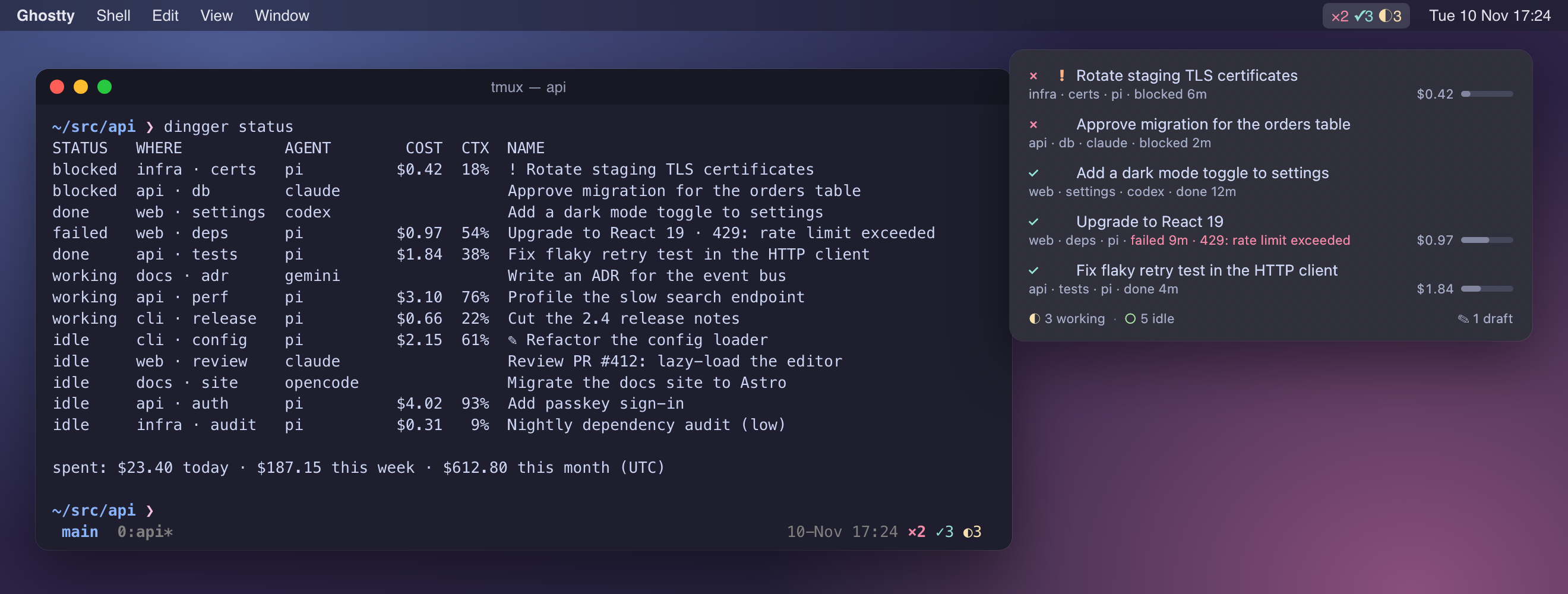
You run a dozen coding agents in tmux panes. One finished ten minutes ago,
one is stuck on a permission prompt, one hit a rate limit, and you are
reading a diff somewhere else. dingger watches every pane in your tmux
server, works out which agent runs where and what it is doing, and tells you
who is waiting for you. Then it takes you there in one keystroke.
- **Every agent at a glance.** It detects 22 agents: Claude Code, Codex, pi,
Gemini, opencode, Cursor, GitHub Copilot, Amp, and 14 more.
- **Waiting agents come to you.** A notification and a sound when an agent
finishes or needs your input, and silence when you are already watching it.
- **One key to the next agent.** ⌃⌥⌘U jumps to the next agent
waiting for you, and raises the exact Ghostty window, tab, and split.
- **Find any agent.** ⌃⌥⇧⌘U opens a Spotlight-style fuzzy search.
- **Survives a restart.** dingger saves your tmux layout as you work, and
after a reboot or crash brings back every session, window, and pane, with
each agent resuming its own conversation.
- **Nothing to migrate.** No new terminal, no new multiplexer: dingger is a
client of your tmux server, and keeps its state in tmux options.
## Statuses
dingger tracks [herdr](https://github.com/herdrdev/herdr)'s statuses, with
herdr's state machine:
| | status | meaning |
|---|---|---|
| `×` | **blocked** | needs your input: a permission prompt, a question, a dialog |
| `✓` | **done** | finished a turn while you were looking elsewhere |
| `◐` | **working** | a turn is in flight |
| `○` | **idle** | at its prompt, nothing new since you looked |
A turn that finishes in the tmux window you are looking at stays idle.
Looking at a window marks its agents seen. Waiting agents are listed blocked
first, then done, each oldest first. The top one is the next waiting agent:
where a jump goes.
## The floating panel
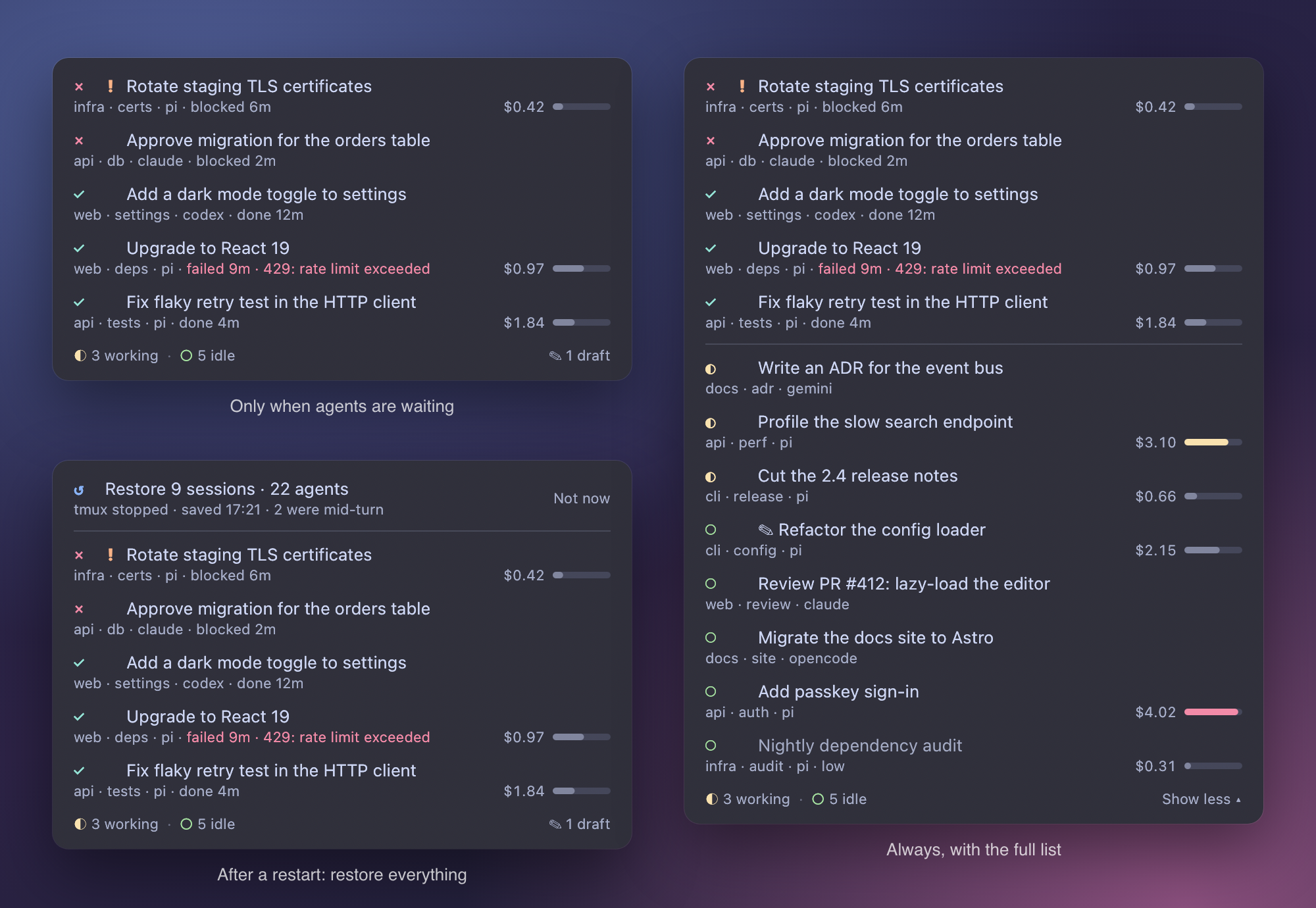
An always-on-top panel that never takes focus, on every Space and over
full-screen apps. Click a row to jump to that agent, drag the panel anywhere.
It can show itself only while agents are waiting, or always, with the full
list a click away. ⌃⌥⌘E turns it on and off.
Each row says where the agent is (session, window, harness) and for how long
it has waited. pi agents also show what they spent today and how full their
context window is.
## Agent search
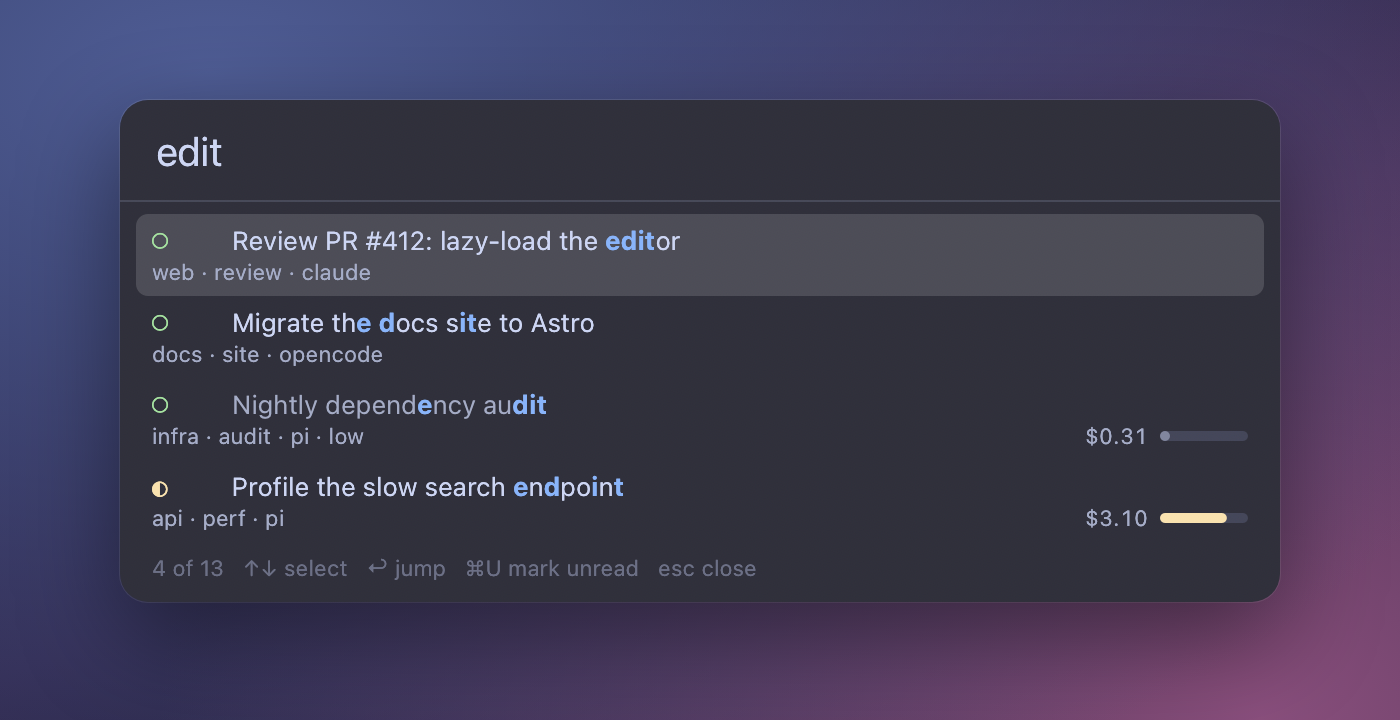
⌃⌥⇧⌘U from anywhere. Type a few letters of an agent's name,
session, window, harness, status, or directory, or a word of a draft you left
in its input box. ↩ jumps there. With nothing typed,
↩ goes to the next waiting agent. Focus goes back
where it was when you close it.
## The tmux status line
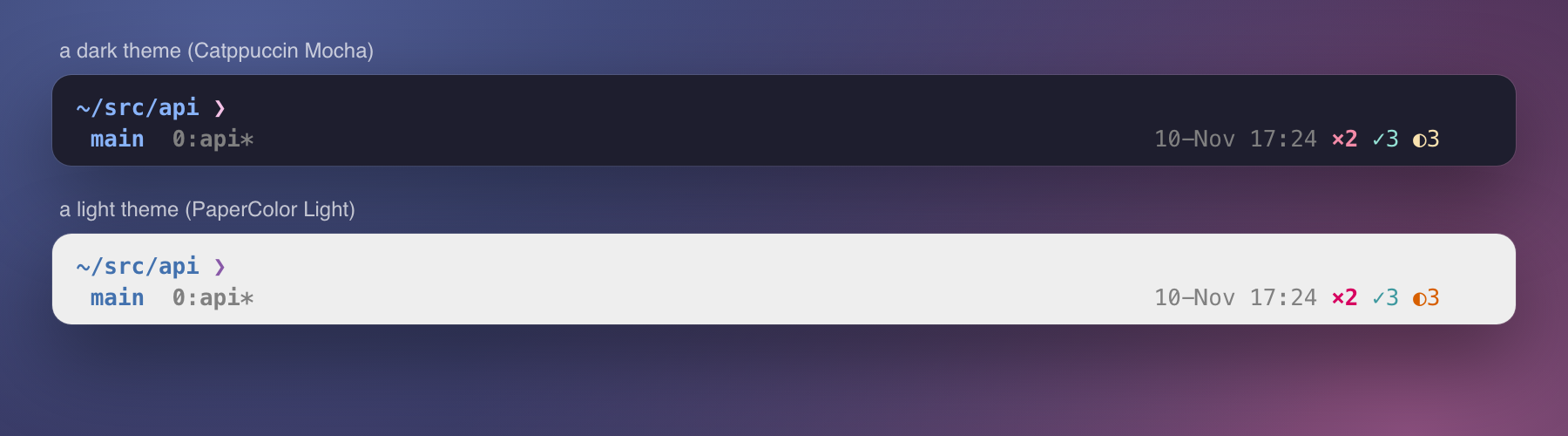
The same counts after the clock, in your terminal theme's own colors. Click
them to jump to the next waiting agent.
The menu bar shows the counts too. Its menu lists every agent and what pi
agents spent today, this week, and this month.
## Restore after a restart
dingger saves your tmux layout as it changes: sessions, windows, panes,
layouts, directories, and what runs in each pane. When tmux stops (a
restart, a crash, `kill-server`), the panel, the menu, and the status line
offer to bring it all back. Agents resume their own sessions: pi with
`pi --session`, Claude Code with `claude --resume`. Other programs get their
command line typed at the prompt but not run, so nothing starts behind
your back.
## More for pi agents
With dingger's pi extension (`dingger install pi`):
- **Exact states.** The extension reports state directly, including dialogs
during a run, cancelled runs, and failed ones: "failed 3m · 429: rate limit
exceeded".
- **Session names.** Every session gets a short name of what it is about,
from the model, kept current as the work moves on. A name you give it with
`/name` is never replaced.
- **What agents cost.** Today, this week, and this month, counted the way
pi's footer counts, with forked sessions counted once.
- **Context use.** A meter per agent that turns yellow above 70% and red
above 90%.
- **Forgotten drafts.** `✎` marks an agent with text left in its input box,
and restore puts the draft back.
- **Importance.** `/importance high` puts an agent ahead of the others with
its status and marks it `!`. A low agent is quiet and dimmed.
- **Mark as unread.** `/unread` turns an agent done again, to come back to.
- **Kept current.** When dingger updates its extension, the menu offers to
reload the agents on the old one. Each reloads only when it is idle, out of
sight, and has an empty input box.
Claude Code and the other agents get the rest: detection from the screen,
statuses, notifications, jumping, search, and restore.
## Install
dingger runs on macOS, with tmux. You need Rust, and Xcode's command line
tools for the menu bar app.
```bash
# the daemon and CLI
cargo build --release
cp target/release/dingger ~/.local/bin/dingger
codesign --force --sign - ~/.local/bin/dingger # sign the copy, or macOS kills it
# the menu bar app, the panel, and search
swiftc -O -o target/dingger-menu menubar/*.swift # bundle it as ~/Applications/dingger.app
```
1. **Start at login.** Adjust the user path in
`packaging/launchd/dev.dingger.{dingger,menubar}.plist`, copy both to
`~/Library/LaunchAgents/`, then run
`launchctl bootstrap gui/$(id -u) ` for each.
2. **Add the status line.** At the end of your tmux config, add the
following line, then reload with `tmux source-file ~/.tmux.conf`:
```tmux
source-file /path/to/dingger/packaging/tmux/dingger.tmux
```
It replaces `status-right`, turns on `focus-events`, and adds hooks
that tell dingger where you are looking. Clicking the counts needs
`set -g mouse on`.
3. **Connect your agents** (optional, recommended):
```bash
dingger install pi # pi: exact states, names, cost, drafts, restore
dingger install claude # Claude Code: its session, for restore
dingger install zsh # your exact command lines, for restore
```
Shortcuts live in `~/.config/dingger/config.toml` (Settings… in the menu).
[Install in detail](docs/reference.md#install-in-detail) covers what each
step changes.
## Usage
```bash
dingger status # every agent, in the order they wait
dingger focus # jump to the next waiting agent
dingger restore --dry-run # what a restore would bring back
dingger importance high # in an agent's pane: list it first
dingger unread # in an agent's pane: mark it unread
dingger reload-agents # move pi agents onto the current extension
dingger manifests update # refresh detection rules from herdr's catalog
```
`dingger status`, abridged:
```text
STATUS WHERE AGENT COST CTX NAME
blocked infra · certs pi $0.42 18% ! Rotate staging TLS certificates
blocked api · db claude Approve migration for the orders table
failed web · deps pi $0.97 54% Upgrade to React 19 · 429: rate limit exceeded
done api · tests pi $1.84 38% Fix flaky retry test in the HTTP client
working api · perf pi $3.10 76% Profile the slow search endpoint
idle cli · config pi $2.15 61% ✎ Refactor the config loader
spent: $23.40 today · $187.15 this week · $612.80 this month (UTC)
```
## How it works
A daemon (`dingger watch`) polls your tmux server every second and wakes at
once on agent reports and tmux focus hooks. It decides each pane's status
from the agent's own reports where an integration exists, and otherwise
from the screen, through herdr's detection rules. It writes everything to
tmux pane options, so the menu bar app, the panel, and the status line are
stateless readers, and restarting dingger loses nothing. dingger owns no
terminals, and does not need tmux to be running when it starts.
The [reference](docs/reference.md) has the details: every feature's exact
behavior, where state comes from, and how the pi extension is kept current.
## Testing
```bash
cargo test # engine and state-machine tests
tests/e2e.sh # end to end, on a tmux server of its own
tests/pi-live.sh # a real pi release, with a fake model
tests/shutdown.sh # restore after the ways an OS stops tmux
```
None of them touch your tmux server, your agents, or your pi setup.
[Testing](docs/reference.md#testing) lists what each covers. The README's
images are real renders of made-up agents: `docs/screenshots.sh` makes them.
## Credits
dingger's detection engine and agent rules come from
[herdr](https://github.com/herdrdev/herdr) (Apache-2.0), and so do its
statuses, state machine, colors, and sounds.